
RTX 5060 Gaming PC Build : Complete Guide
By the RigVault Hardware Team
A full ~$700 gaming PC build guide around the RTX 5060 — parts list, real 1080p benchmarks, and where its 8GB VRAM starts to matter.
The RTX 5060 has settled into a clear identity in 2026: it's the definitive 1080p gaming card, and a genuinely good one, at a $299 MSRP that undercuts nearly everything else NVIDIA makes. Built on the same Blackwell architecture as its pricier siblings, it brings DLSS 4 Multi Frame Generation, fourth-generation RT cores, and fast GDDR7 memory down to a price point that doesn't demand a second mortgage.
This guide walks through a complete, real parts list built around the RTX 5060, what kind of performance to expect across popular titles, and where this card's 8GB of VRAM genuinely starts to show its limits — because it does have one, and it's worth knowing about before you buy rather than after.
QUICK SPECS
RTX 5060 at a Glance
$299 MSRP
8GB GDDR7 VRAM
145W TDP
550W Min. PSU
THE FULL BUILD
A Complete ~$700 RTX 5060 Build
The RTX 5060 is built on the Blackwell GB206 die, connects via PCIe 5.0 x8, and carries 3,840 CUDA cores alongside 32MB of L2 cache that helps offset its relatively narrow 128-bit memory bus. At 145W, it's an efficient card that doesn't demand exotic cooling or a beefy power supply — a real 550W unit is genuinely enough, even paired with a mid-range CPU.
The Full Parts Checklist
This build lands right around $693 — deliberately built on the AM4 platform to keep costs down, since the Ryzen 5 5600 ships with a bundled cooler and AM4 motherboards remain some of the cheapest DDR4-based boards on the market. It's not the platform with the longest upgrade runway (AM5 has replaced it going forward), but for a GPU-focused budget build where the RTX 5060 is doing the heavy lifting, it's a sound way to keep more of the budget pointed at the graphics card.
If platform longevity matters more to you than shaving the last $150 off the total, swapping in a Ryzen 5 7600 and a B650 AM5 motherboard pushes the build closer to $850, but gives you a clear CPU upgrade path for a few more years.
PERFORMANCE
What FPS Actually Looks Like
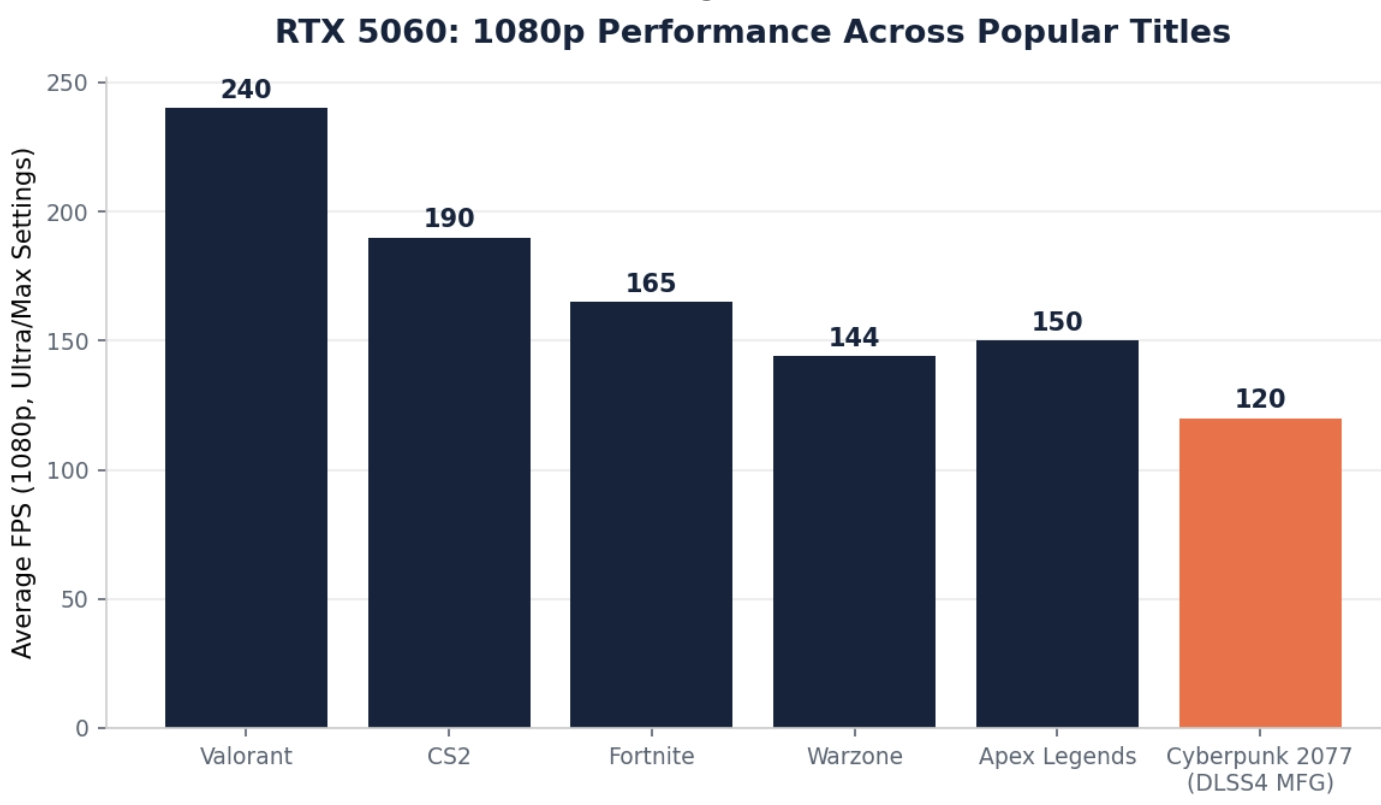
At 1080p, the RTX 5060 is comfortably a 144+ FPS card in nearly every competitive title — Valorant pushes well past 240 FPS, CS2 sits around 190, and Fortnite and Apex Legends both land in the 150–165 range at high-to-max settings. These numbers matter if you're running a high-refresh 1080p monitor, since the GPU won't be the bottleneck holding back your panel's full refresh rate.
In heavier AAA titles, DLSS 4's Multi Frame Generation does real work. Cyberpunk 2077 with ray tracing enabled and DLSS 4 MFG active lands around 120 FPS at 1080p — a title that would otherwise sit in the 45–60 FPS range natively on this class of hardware. That's the practical value of Blackwell's frame generation: it turns a demanding, path-traced title into a smooth experience without dropping visual settings.
THE VRAM CAVEAT
Where 8GB Starts to Matter
The RTX 5060's one real limitation is its 8GB VRAM pool. At 1080p, it's rarely an issue — most current titles stay comfortably within that budget even at Ultra settings. At 1440p, it becomes title-dependent: esports and well-optimized titles run fine, but VRAM-hungry open-world games at high-to-ultra texture settings can hit the ceiling. Independent testing from GamersNexus found the 16GB RTX 5060 Ti outperforming the 5060 by as much as 165% in specifically VRAM-starved scenarios — not because the Ti is dramatically faster on paper, but because the 8GB card simply runs out of memory and stutters while the 16GB card doesn't
.The practical takeaway: if your primary monitor is 1080p, this is a non-issue and the RTX 5060 is the stronger value pick. If you're gaming at 1440p or planning to upgrade your monitor within this GPU's lifespan, the RTX 5060 Ti's extra $130 and 16GB of VRAM is a more future-proof choice — see our GPU Buying Guide for the fuller breakdown of that decision.
BUILD NOTES
What Makes This Build Easy for First-Timers
This particular parts list was chosen partly for build-friendliness, not just price. The Ryzen 5 5600 comes with its Wraith Stealth cooler already fitted with thermal paste — you mount it, lock the retention lever, and move on, no separate cooler purchase or paste application required. The RTX 5060 uses a single 8-pin power connector rather than the newer 12V-2x6 connector found on higher-end Blackwell cards, which sidesteps a common source of confusion and cable-routing complexity for new builders.
Expect roughly 2–3 hours for a first-time build with this parts list, or under 90 minutes if you've assembled a PC before. The one step that consistently trips up first-timers: installing the motherboard's I/O shield into the case's rear opening before the motherboard itself goes in. It's a separate metal plate, easy to forget, and effectively impossible to install after the board is seated — worth checking off first before anything else goes into the case.
WHY THIS BUILD
Who This Build Is Actually For
This build is aimed squarely at 1080p gamers — competitive players on a 144Hz+ monitor, or anyone who wants smooth performance in current AAA titles without spending into four figures. It's not the build for someone specifically targeting 1440p Ultra settings across the board; that's the RTX 5060 Ti's territory, covered in our RTX 5070 / 5070 Ti Build Guide for the tier above it.
It's also a genuinely good starter build for someone new to PC building. The component count is manageable, none of the parts require unusual handling, and the total cost stays low enough that a first-build mistake — while still worth avoiding — isn't a catastrophic financial risk the way it would be on a $2,000+ enthusiast build.
UPGRADE PATH
Where to Go From Here
If you outgrow this build, the GPU is the natural first upgrade — the AM4 platform and 650W PSU here have enough headroom to support a stronger card later without needing a full rebuild. If you find yourself wanting more CPU-bound performance for streaming or multitasking, moving to AM5 with a Ryzen 5 7600 or 7600X is the next logical step, though at that point you're also replacing the motherboard and RAM as a set. See our How to Upgrade a Gaming PC guide for a fuller walkthrough of sequencing upgrades without wasting money on parts you'll replace again soon after.
GENERATION COMPARISON
How Much Better Is This Than the RTX 4060?
For anyone upgrading from the previous generation, the improvement is real but not revolutionary in raw rasterized terms. Independent testing from TechSpot found the RTX 5060 roughly 22% faster than the RTX 4060 at 1080p and 27% faster at 1440p — a solid but not dramatic generational gain. Where the difference becomes more meaningful is in features: GDDR7 memory, DLSS 4 with Multi Frame Generation, and fourth-generation RT cores are all exclusive to the new generation, and none of them are available on the 4060 regardless of driver updates.
Positioned against older mid-range cards, the RTX 5060 lands in the same rough performance bracket as the RTX 3070 and RTX 4060 Ti — meaning you're getting previous-generation raw performance levels, but with current-generation features and efficiency at a genuinely mainstream price. For anyone still running a GTX 10-series or RTX 20-series card, the jump to an RTX 5060 build is substantial across the board.
COMMON MISTAKES
What to Avoid With This Build
• Pairing this GPU with an underpowered PSU to save $10–15 — a genuine 80+ Bronze or better unit from a known brand is worth the small premium over an unbranded unit, especially since PSU failures can potentially damage other components.
• Skipping the I/O shield installation order — as mentioned above, this has to go in before the motherboard, and it's the single most common first-build mistake that requires backtracking to fix.
• Buying DDR4 RAM rated well above what the AM4 platform and Ryzen 5 5600 can actually use — the CPU's memory controller has a practical ceiling, and paying extra for rated speeds beyond roughly 3600 MT/s on this platform doesn't translate into real performance gains.
• Assuming more case fans always means better cooling — airflow direction and a clear intake-to-exhaust path matter more than raw fan count. Two or three well-placed fans in a mesh-front case outperform five fans fighting each other's airflow in a sealed glass case.
REGIONAL PRICING
Does This Build Cost the Same Everywhere?
The $693 figure above reflects US retail pricing. Outside the US, identical components commonly run 10–30% higher due to import duties, shipping, and local retailer margins — UK custom builds around this GPU tier, for instance, commonly start closer to £1,100 once VAT and local markups are factored in, even before accounting for a slightly different parts mix. If you're shopping outside the US, treat this parts list and its reasoning as a template to adapt to local pricing rather than an exact target.
It's also worth checking prebuilt options at your local price point before committing to building — during sales events, some retailers have offered complete RTX 5060 prebuilts (paired with a Core i5 and 32GB RAM) for under $800, a gap small enough from this DIY build's cost that it's worth comparing directly rather than assuming building is automatically the better value in every market and every season.